The Count element allows you to record the position and number of various groups of assets
on the site. For example, you can use a Count element to record the position of manholes or
count the number of trees.
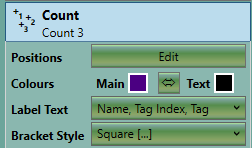
The properties that are exposed for the Count element are summarised below.
|
-
Positions
The Positions Edit button provides access to the editor where Points can be
added/edited for the Count.
-
Colours
Here, you can set the Main and Text colour of the Count element. This can be
useful for visually separating different Count measurements or making them easier to
see against the colours of the topography.
-
Label Text
Customize the Count label, to display information most relevant to your project.
Select one or more options: Name (Count element name); Tag Index (count feature
index within the element); Tag (the descriptors you may have given to each Count
feature).
-
Bracket Style
The bracket style allows you to change the style of the brackets enclosing the
item number. This can also be used to visually separate different Count measurements
in your project. You can set the bracket style to 'none' if you want to show the
number without brackets.
|